Lawn Mowing Simulator Codes
All current and previous game codes for Lawn Mowing Simulator on Roblox.
21 active3 expired| Code | Description | Status | Works |
|---|---|---|---|
| This code credits your account with Pumpkin. | Active | ||
| This code credits your account with the 275k Slime Pet. | Active | ||
| This code credits your account with the 350k Favorites Slime Pet. | Active | ||
| This code credits your account with the 40m Visitors Slime Pet. | Active | ||
| This code credits your account with the 300k Favorites Slime Pet. | Active | ||
| This code credits your account with the 200k Likes Slime Pet. | Active | ||
| This code credits your account with the King of Hearts Slime Pet. | Active | ||
| This code credits your account with the Members Slime Pet. | Active | ||
| This code credits your account with the Blue Bird Mount. | Active | ||
| This code credits your account with the Sunflower Pet. | Active | ||
| This code credits your account with the Pink Slime Pet. | Active | ||
| This code credits your account with the Party Slime Pet. | Active | ||
| This code credits your account with the Cyber Slime Pet. | Active | ||
| This code credits your account with the Daisy the Florist Pet. | Active | ||
| This code credits your account with the Jimbo the Farmer Pet. | Active | ||
| This code credits your account with the 250k Favorites Slime Pet. | Active | ||
| This code credits your account with the 450k Favorites Slime Pet. | Active | ||
| This code credits your account with the 500k Favorites Slime Pet. | Active | ||
| This code credits your account with the 525k Favorites Slime Pet. | Active | ||
| This code credits your account with the 250k Favorites Slime. | Check | ||
| This code credits your account with Liked Slime Pet. | Check | ||
| This code credits your account with Visitors Slime Pet. | Expired | ||
| This code credits your account with 250k Favorites Slime. | Expired | ||
| This code credits your account with the 275k Favorites Slime Pet. | Expired | ||
How to claim codes in Lawn Mowing Simulator
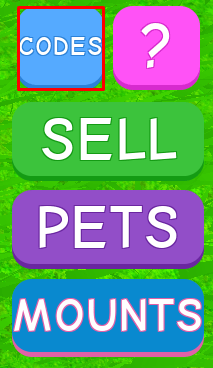
To use codes in Lawn Mowing Simulator, first click on the CODES button at the right side of the screen:
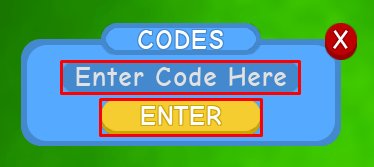
Next, type your code into the Enter Code Here box, and then click ENTER:
About Lawn Mowing Simulator
Put your lawn mowing skills to the test in Lawn Mowing Simulator, a game where you'll be able to convert grass into money! To get started, simply head over to a field of grass found next to the spawn area. Through walking over it with your lawn mower equipped, you'll add some grass to your storage container. When it gets full, head back to spawn and over to the marketplace, where you'll be able to exchange your freshly-mown grass for some cash.
Purchase new mowers, containers, as well as boosts for your character with the cash you've earned. You'll also be able to upgrade your lawn mower's tiers with the bonus XP you've gained. Once you've reached a high enough level, you'll be able to use the world portal to teleport to new planets. Here you'll find new grass to mow, pets to collect, as well as cool new locations to explore!