Sword Factory GUI Codes
All current and previous game codes for Sword Factory GUI on Roblox.
19 active6 expired| Code | Description | Status | Works |
|---|---|---|---|
| This code credits your account with Free Gems. | Active | ||
| This code credits your account with 10,000 Gems. | Active | ||
| This code credits your account with 10,000 Gems. | Active | ||
| This code credits your account with 25,000 Gems. | Active | ||
| This code credits your account with 15,000 Gems. | Active | ||
| This code credits your account with 25,000 Gems. | Active | ||
| This code credits your account with 10,000 Gems. | Active | ||
| This code credits your account with 10,000 Gems. | Active | ||
| This code credits your account with 10,000 Gems. | Active | ||
| This code credits your account with 5,000 Gems. | Active | ||
| This code credits your account with 3 2x Money Boosts and 3 2x EXP Boosts. | Active | ||
| This code credits your account with 10,000 Gems. | Active | ||
| This code credits your account with 2 2x Luck Boosts and 2 3x Luck Boosts. | Active | ||
| This code credits your account with 20,000 Gems. | Active | ||
| This code credits your account with 10,000 Gems. | Active | ||
| This code credits your account with 25,000 Gems. | Active | ||
| This code credits your account with 10,000 Gems. | Active | ||
| This code credits your account with -. | Check | ||
| This code credits your account with -. | Check | ||
| This code credits your account with -. | Expired | ||
| This code credits your account with 10,000 Gems. | Expired | ||
| This code credits your account with 2 Faster Ascender Boosts And 2 Faster Machine Boosts. | Expired | ||
| This code credits your account with 15,000 Gems. | Expired | ||
| This code credits your account with 10,000 Gems. | Expired | ||
| This code credits your account with 20,000 Gems. | Expired | ||
How to claim codes in Sword Factory GUI
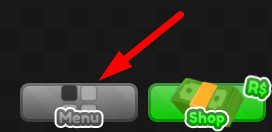
To redeem codes in Sword Factory GUI, first press the Menu button at the bottom of the screen:
Then, press the Settings button:
!The Settings button in Sword Factory GUI
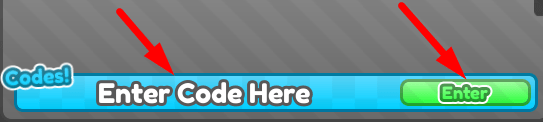
Lastly, enter your code in the Enter Code Here box and press the Enter button:
About Sword Factory GUI
In Sword Factory GUI, your job is to go into a factory where all kinds of swords are made and craft your own powerful swords. This is the first step.
Once you’ve crafted a basic sword shape, then you have to select its main attributes. In other words, this decides some of the sword’s stats and powers.
Once you’ve fully crafted a sword in the factory, you can do several things. You can use resources to improve its stats. You can sell it for money. Or, you can test its strength by going into battle with it and fighting all kinds of deadly monsters.
Each sword features higher tiers which make it more and more powerful.