
The Last Road Codes
All current and previous game codes for The Last Road on Roblox.
 3 active0 expired
| Code | Description | Status | Works |
|---|---|---|---|
| This code credits your account with 22,000 Cash. | Active | ||
| This code credits your account with 13,000 Cash. | Active | ||
| This code credits your account with Cash. | Check |
How to claim codes in The Last Road
To claim codes in The Last Road, click the gift icon on the bottom-left side of your screen:

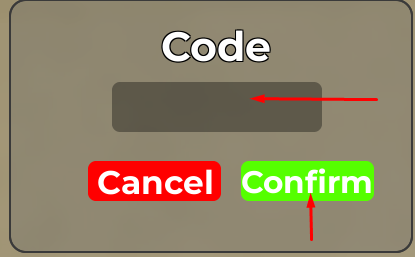
In the codes section, click the empty box to type your code, then click the "Confirm" button to claim your rewards:

The Last Road Code Guardian
Personally finds and maintains every code on this page, with around-the-clock help from the rest of our Code Guardians.
Roblox Den's code tracker continually scans Roblox.com, social channels, user reports, game developer networks and other sources, and we've had 748,593 reports from players on Works, Doesn't work and new codes. But before any code is listed on our site, or marked as Expired, our Code Guardians check in-game that it works and that its rewards and requirements are right. That's why every code you try on Roblox Den works, and 0 other players have copied a code since you landed on this page:.
Checks every code in-game
Erwin tests every new The Last Road code in-game, and re-checks any code that enough players report as not working.
Keeps this page up to date
When The Last Road changes how codes are claimed, adds a new requirement or launches a new promotion, Erwin makes sure it's covered here first.
Lists exact rewards and requirements
Every code shows exactly what it gives and any level or gamepass it needs, so you know what you're getting before you redeem it.


Erwin isn't the only Code Guardian around here: Nicole and Renato check new codes for this game whenever Erwin is away or asleep.
Meet the rest of the teamAbout The Last Road
The Last Road offers a driving experience accessible across various platforms, including mobile, PC, notebook, console, and tablet. Players can immerse themselves in the game using detailed controls, especially on PC. These controls allow for precise vehicle operation, with 'E' to shift up gears and 'Q' to shift down, while 'L' or 'H' manage the vehicle's lights. An optional first-person view, activated by 'V', enhances the driving realism. Standard 'W, A, S, D' keys control movement, and a 'FreeCam' feature (Shift + C or P) provides flexible camera angles, with the option to slow down its movement by holding the left Shift key. This setup suggests a focus on realistic vehicle interaction and exploration.